Trying something without breaking the site
Say your website works and people visit it. Now you want to try a new design for the home page. If you work straight on the live version, then while the design is half done, your site is half broken.
A branch is a copy off to the side
A branch is a copy of the project that you work on off to the side. The main line carries on as it is, and you split off from it.
The main line is called main. It's the official version. Every branch starts from main at a certain point and then gets commits of its own. Meanwhile nothing happens on main. On your branch you can try things, break things and fix them.
Merge it, or just leave it
Did it work out? Join the branch back into main. That's called a merge: everything from the branch goes into the main line, and main carries on from there.
Didn't work out? Leave the branch. Main is untouched, because you never touched it.
Several branches at once
You can have several branches at the same time: one for the new design, one for a bug fix, one for a page you haven't decided on. Each lives on its own until you merge it.
Create a branch on the website
- On the repo page, at the top left of the file list, click the button that says main.
- In the box that opens, type a name for the new branch. Short, and saying what it's for, like new-homepage.
- Click the line Create branch new-homepage from main.
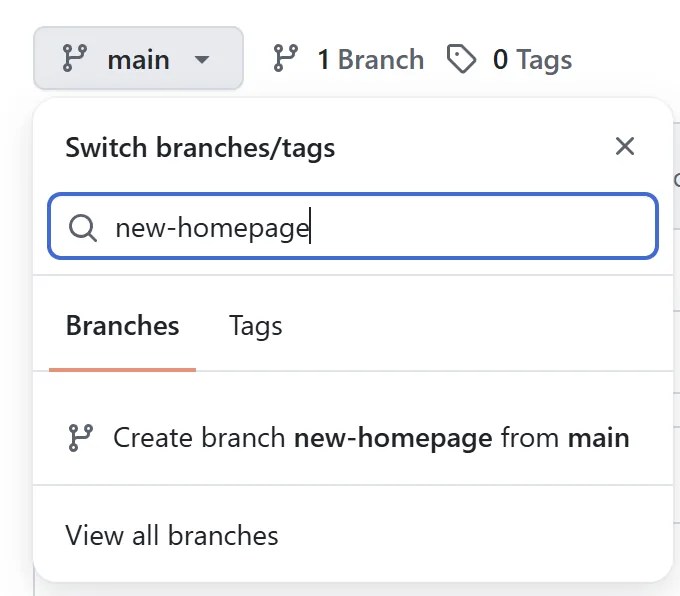 123
- Click the button that says main.
- Type the name of your new branch.
- Click Create branch … from main.
Where your commits go now
The button doesn't say main anymore. It shows your branch name. Every commit you make from now on goes to this branch, not to main.
 1
- The button shows the branch you're on: new-homepage.
Change something in the README and commit it. Then switch back to main with the same button. The change isn't there. It's waiting on your branch.
Read more
- About branches – GitHub Docs
- Creating and deleting branches – GitHub Docs
- The demo repo my-site – the repo used for the screenshots